
WiFi Mouse Pro Narzędzia Użytkowe Android 2.1+ 2026
- Thread starter Hater
- Data rozpoczęcia

WiFi Mouse Pro 1.6.6
opis:
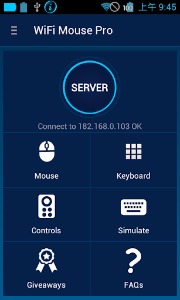
Zmień swoje urządzenie z Androidem w klawiaturę i mysz do komputera za pomocną aplikacji WiFi Mouse Pro.
opis:
Transform your phone into a wireless mouse, keyboard and trackpad using WiFi Mouse. WiFi Mouse supports speech-to-text as well as multi-finger trackpad gestures. It also support media controller, explorer controller and ppt presentation controller features. WiFi Mouse enables you to control your PC, MAC or HTPC effortlessly through a local network connection.
Features:
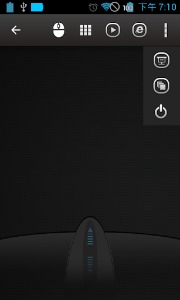
* Mouse cursor movement:
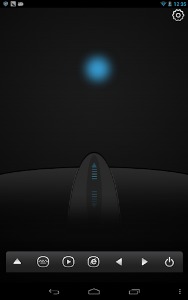
Slide on phone's screen to make the PC/Mac mouse cursor make movement.
* left and right click support
Tap the phone's screen to make PC/Mac mouse left button click.
Double fingers tap the phone's screen to make PC/Mac mouse right button click.
* Middle mouse button scroll
Up/down slide the phone's middle button picture to make PC/Mac middle mouse button scroll.
Two fingers slide up/down to make PC/Mac middle mouse button scroll.
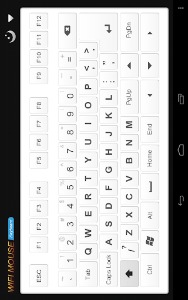
* Remote keyboard input:
Press any mobile phone's key picture, PC/Mac will do the same thing.
* PC/Mac hot keys and combination key:
You can press two keys at the same time, such as ALT+F4,Ctrl+C,Ctrl+P and so on.
* Speech-to-text input for all languages:
If you input method support voice input, PC/Mac will show the same text as the phone get.
* Close to proximity sensor to show desktop:
When your hands close to the phone's proximity sensor to make PC/Mac show desktop.
* Mouse & keyboard full screen:
Very big Mouse buttons and key button.
* Remote media player controller:
You can play/pause/next/previous media players, such as Windows media players, VLC,
Winamp and so on.
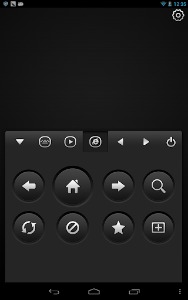
* Remote explorer controller:
Unified remote control IE/Chrome and other internet explorer, you can close the tab,
go to home page,create new tab, go to favorite list, refresh the current page and so on.
* PPT Presentation controller:
You can start/stop Power Point /Keynote, and turn the next/previous page for presentation.
* Auto-connect on application startup
* PC/Mac window controller:
Maximize/Minimize/close the current window.
* Compatible with XP/Windows Vista/Windows 7/Windows 8/Mac OSX/Linux (Ubuntu,Fedora).
Gestures:
* Tap-to-click
* Tap and move for drag
* Two finger tap for right click
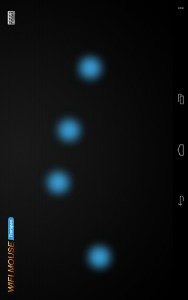
* Two finger scroll
* Pinch to zoom
* Three finger drag or highlight
* Four finger swipe down to show desktop
* Four finger swipe up to maximise current window
* Four finger swipe sideways to change current window focus
* Left handed mouse support (swap left and right mouse click)
* Show desktop when hands over proximity sensor
Note:
1, WiFi Mouse only support Wi-Fi connection(wireless mouse), Bluetooth is not support.
2, More gesture will be added.
3, XMBC will be supported next month.
Features:
* Mouse cursor movement:
Slide on phone's screen to make the PC/Mac mouse cursor make movement.
* left and right click support
Tap the phone's screen to make PC/Mac mouse left button click.
Double fingers tap the phone's screen to make PC/Mac mouse right button click.
* Middle mouse button scroll
Up/down slide the phone's middle button picture to make PC/Mac middle mouse button scroll.
Two fingers slide up/down to make PC/Mac middle mouse button scroll.
* Remote keyboard input:
Press any mobile phone's key picture, PC/Mac will do the same thing.
* PC/Mac hot keys and combination key:
You can press two keys at the same time, such as ALT+F4,Ctrl+C,Ctrl+P and so on.
* Speech-to-text input for all languages:
If you input method support voice input, PC/Mac will show the same text as the phone get.
* Close to proximity sensor to show desktop:
When your hands close to the phone's proximity sensor to make PC/Mac show desktop.
* Mouse & keyboard full screen:
Very big Mouse buttons and key button.
* Remote media player controller:
You can play/pause/next/previous media players, such as Windows media players, VLC,
Winamp and so on.
* Remote explorer controller:
Unified remote control IE/Chrome and other internet explorer, you can close the tab,
go to home page,create new tab, go to favorite list, refresh the current page and so on.
* PPT Presentation controller:
You can start/stop Power Point /Keynote, and turn the next/previous page for presentation.
* Auto-connect on application startup
* PC/Mac window controller:
Maximize/Minimize/close the current window.
* Compatible with XP/Windows Vista/Windows 7/Windows 8/Mac OSX/Linux (Ubuntu,Fedora).
Gestures:
* Tap-to-click
* Tap and move for drag
* Two finger tap for right click
* Two finger scroll
* Pinch to zoom
* Three finger drag or highlight
* Four finger swipe down to show desktop
* Four finger swipe up to maximise current window
* Four finger swipe sideways to change current window focus
* Left handed mouse support (swap left and right mouse click)
* Show desktop when hands over proximity sensor
Note:
1, WiFi Mouse only support Wi-Fi connection(wireless mouse), Bluetooth is not support.
2, More gesture will be added.
3, XMBC will be supported next month.
info:
Producent ..............: Necta
Wersja .................: 1.6.6
Ostatnia aktualizacja ..: 16 stycznia 2꤀15
Kategoria ..............: Narzędzia
Wymagania ..............: Android 2.1 i nowsze
Ocena ..................: 4,3 (ocen: 1 939)
Rozmiar ................: 2,3 MB
Cena ...................: 14,33 zł
Wersja .................: 1.6.6
Ostatnia aktualizacja ..: 16 stycznia 2꤀15
Kategoria ..............: Narzędzia
Wymagania ..............: Android 2.1 i nowsze
Ocena ..................: 4,3 (ocen: 1 939)
Rozmiar ................: 2,3 MB
Cena ...................: 14,33 zł
[gplay]WiFi Mouse Pro w ▷ Google Play[/gplay]
screeny:
youtube:
WiFi Mouse Pro v1.6.6, APK userscloud.com
https://userscloud.com/rhy0vk3clhf9
Załączniki
-
 40.8 KB Odsłony: 340
 -
 39.2 KB Odsłony: 261
 -
 79.8 KB Odsłony: 229
 -
 100.2 KB Odsłony: 246
 -
 69.6 KB Odsłony: 233
 -
 53.4 KB Odsłony: 221
 -
 48.7 KB Odsłony: 229
 -
 122.3 KB Odsłony: 212
Podobne tematy, które mogą Cię również zainteresować:
 | OpenSignal - mapy 3G/4G/WiFi | Aplikacje Android Narzędzia | 0 Odpowiedzi | |
 | Aplikacja tworząca fałszywe wifi? | Dyskusje o aplikacjach na Androida | 6 Odpowiedzi | |
| | WiFi File Transfer Pro | Aplikacje Android Narzędzia | 0 Odpowiedzi | |
| N | Wyłączanie WiFi po wyjściu z domu i włączanie BT w samochodzie | Dyskusje o aplikacjach na Androida | 2 Odpowiedzi | |
 | WiFi Mouse HD | Aplikacje Android | 1 Odpowiedzi |